

| Website | celtx.com |
| Tools | Script Editor Beat Sheet Storyboard Catalog Cast and Crew Budget Schedule |
| Price | $11.24/month (billed yearly) |
| Free Trial | Yes (7 Days) |
| Pros | ✔ Easy-to-navigate ✔ Flexible pricing ✔ Story development and production tools ✔ Collaboration features ✔ Free trial |
| Cons | ✘ Less customizable than other screenwriting apps ✘ Too many additional tools for professional writers ✘ Slower on larger projects |

4.5 out of 5
Summary
Celtx offers flexible pricing, collaboration, and all-in-one production tools, but less customizable than other screenwriting apps.
As a screenwriter, I’ve used a range of tools over the years to manage scripts and streamline my workflow. In this review, I’ll take a closer look at Celtx, focusing on its features, pricing, and ease of use.
Celtx offers a 7-day free trial, which makes it easy to test the platform and decide whether it’s right for you.
What Is Celtx?
Celtx is a cloud-based scriptwriting and production planning platform used for film, television, and other creative projects. The name Celtx stands for Crew, Equipment, Location, Talent, and XML, which reflects its focus on production planning as much as scriptwriting.
It’s designed to support both the writing process and the practical side of production, keeping everything organized in one place. Alongside its script editor, Celtx includes tools for outlining, storyboarding, breakdowns, and scheduling, making it a broader production tool rather than just a writing app.
Who Can Use It?
Celtx is used by creatives working in film, television, and other narrative formats. It’s a practical option for screenwriters, filmmakers, and producers who want to keep scripts and production details organized in one place.
It can also be used for projects like stage plays, documentaries, video games, and novels, making it flexible enough for different types of storytelling.
Features
Celtx includes a wide range of features, but these are the ones that stood out to me and had the biggest impact on my workflow while using the platform.
Script Editor & Industry-Standard Formatting

The script editor uses industry-standard screenplay formatting for scene headings, action, dialogue, character names, and transitions. This lets you focus on writing without worrying about layout or formatting rules.
That said, the editor isn’t as customizable as some writing-only screenwriting apps, which may matter if you like fine-tuning formatting or shortcuts.
Beat Sheets

Beat Sheets help outline your story by breaking it down into key moments or story beats. This approach works well for structuring a screenplay and keeping track of pacing, especially during early drafts.
However, writers who prefer a more freeform, index-card-style approach may find beat sheets slightly more rigid.
Revision Mode
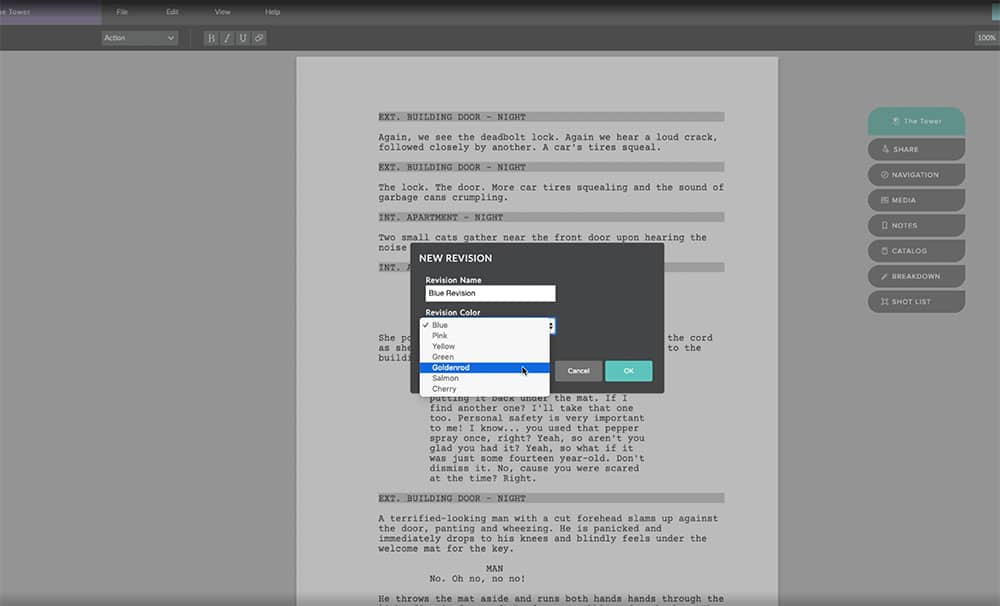
Revision Mode helps manage multiple drafts and revisions, which is useful during rewrites and collaboration. While effective, it isn’t as detailed as the change-tracking tools found in some other dedicated writing software.
Comments & Collaboration

Built-in notes and comments make it easier to manage feedback when working with co-writers, directors, or producers. Having everything in one place helps avoid juggling multiple files or email threads.
Storyboarding

The storyboarding tools allow you to visually plan scenes and shots alongside your script. They’re particularly useful for writer-directors or filmmakers, but may feel unnecessary if you prefer to work purely on the page.
Breakdown Mode

Breakdown Mode provides a scene-by-scene overview of your script, highlighting characters, locations, and other key elements. These tools tend to be most useful once a script is locked, rather than during early drafts.
Scheduling Tools

The scheduling tools help organize your production timeline by breaking the script into shoot days and scenes. Again, these tools are more useful once a project moves into pre-production and less relevant if you’re focused purely on writing.
Budgeting

The budgeting tools allow you to estimate and track production costs based on elements pulled from your script. While not essential for screenwriters, they can be helpful if you’re also producing or planning a smaller project.
Pricing

Here’s a quick overview of what you get with each Celtx plan, and how they compare in terms of features, project limits, and who each plan is best suited for.
| Feature | Free | Writer | Writer Pro | Team |
|---|---|---|---|---|
| Price | $0 | $11.24/month (billed yearly) | $18.74/month (billed yearly) | $44.95/month (billed yearly) |
| Projects | 1 | Up to 3 | Unlimited | Unlimited |
| Script Editor | ✔ | ✔ | ✔ | ✔ |
| Unlimited Comments | ✘ | ✔ | ✔ | ✔ |
| Story Development Tools | ✘ | ✘ | ✔ | ✔ |
| Production Planning Tools | ✘ | ✘ | ✘ | ✔ |
| Team Features | ✘ | ✘ | ✘ | ✔ |
| Sharing & Collaboration | ✔ (basic) | ✔ | ✔ | ✔ |
| Best For | Trying it out or writing a single script | Solo screenwriters | Screenwriters developing multiple projects | Teams and full productions |
If you’re on the fence, they offer a 7-day free trial, which makes it easy to try out the platform yourself before subscribing.
Is Celtx Worth It or Not?
In short, yes. Celtx offers flexible pricing, an interface that’s easy to navigate, and a wide range of tools beyond the Script Editor.
It’s a strong option for people working on smaller productions who are also producing and directing and want everything under one roof.
However, more experienced writers who are focused purely on writing may find some of the extra production tools unnecessary. Also, it would be great if you could customize the Script Editor more.
Lastly, because Celtx is cloud-based, larger or more complex projects can sometimes feel a bit slower, particularly when loading or switching between tools.
