

| Website | format.com |
| Tools | Website Builder |
| Templates | 200+ |
| Price | $14/month or £120/year |
| Free Trial | Yes (14 days) |
| Pros | ✔ Simple visual editor ✔ Wide range of templates ✔ Proofing and file sharing ✔ Additional masterclasses |
| Cons | ✘ Limited functionality ✘ Pricier than other website builders |

4 out of 5
Summary
Easy-to-use visual editor with a range of templates, but limited functionality and higher pricing compared to other website builders.
As a filmmaker who has built multiple portfolio websites to attract clients, I’m always interested in tools that can speed up the process.
In this Format review, I’ll share my experience after testing the platform, focusing on ease of use, features, and pricing.
Get 50% off annual subscriptions. Create a simple portfolio website to showcase your work. 🙌
What Is Format?
Format is an all-in-one website builder for people without coding skills who want to create a portfolio to showcase their work.
It includes hosting and templates, so you don’t need to set up your own server or install anything, and it’s built specifically with portfolio sites in mind.
Who Is Format For?
Format is a good fit for creatives who want a straightforward way to showcase their work online, including filmmakers, photographers, artists, and fashion designers.
You can use it to build portfolio pages, sell digital work, or share projects with potential clients.
How Does It Work?
Format works like a standard portfolio website builder, using templates and a visual editor to let you build and manage a site quickly. Once you’re signed up, the setup process is straightforward.
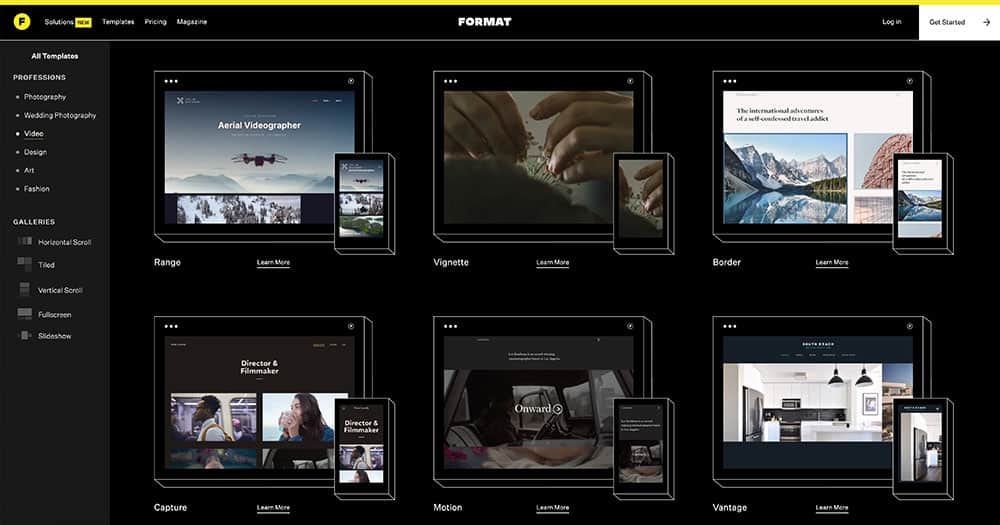
Here’s a quick step-by-step guide:
- Visit the main website and click Get Started.
- Create your account using your email address and a password.
- Select your creative type to help Format suggest themes and layout options.
- Choose a template that fits your style.
- Upload your work and organize it into galleries.
- Customize your site’s design, including fonts, colors, menus, and layout settings.
- Create key pages like About and Contact, and add your contact details.
- Preview your site on desktop and mobile to make sure everything looks right.
- Publish your site when you’re ready.
Don’t like it? You can cancel at any time.
Format Features
Below are some of the features that stood out to me while testing Format.
Ease of Use

The drag-and-drop editor makes it easy to build and edit pages, even if you haven’t built a website before.
Adding images, text, and galleries feels intuitive, and you can see changes instantly as you work. Overall, the interface feels straightforward and easy to get to grips with.
Templates and Design Options
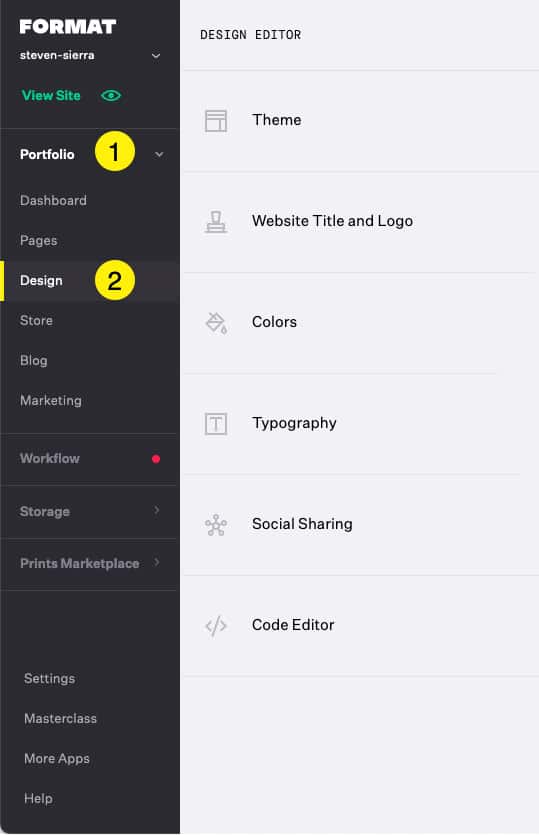
There’s a wide range of professionally designed templates to choose from, all built with portfolio sites in mind. You can adjust layouts, colors, and typography to better match your style, which makes it easy to get something that looks polished quickly.
That said, while templates are customizable, overall design flexibility is more limited than with some general-purpose website builders.
Portfolio and Media Presentation

It handles high-quality images and video well, which makes it a good fit for visual portfolios. Media is displayed cleanly, and galleries feel focused on presentation without noticeably slowing things down.
Advanced video hosting features are limited to higher-tier plans, which is worth keeping in mind if video is a big part of your work.
Mobile Responsiveness
Templates are fully responsive, so pages automatically adapt to different screen sizes. This makes portfolios easy to view on desktops, tablets, and smartphones without needing separate mobile layouts.
File Sharing and Delivery

File sharing tools are included, such as downloadable galleries and shared links, which make it easier to deliver photos or project files to clients in a clean, organized way.
Custom Domains
You can connect a custom domain so your portfolio uses a professional web address instead of a default subdomain. If you already own a domain, you can transfer it over as well.
Project and Client Organization

There are basic tools to help you keep track of projects and client details in one place, which makes it easier to stay organized when working on multiple projects.
That said, the tools are fairly simple and won’t replace a dedicated project management platform.
Contact Management
You can store and manage client contact details directly within the site, with contacts linked to projects to help keep everything organized as your client list grows.
Contracts and Agreements

There are tools for creating and sending contracts directly through the site, with support for digital sharing and online signatures. This works well for simple agreements but may feel limited for more complex workflows.
Customer Support
Customer support is available if you need help setting things up or run into issues along the way. Support is available around the clock, which is useful if you’re working outside regular hours.
Format Pricing
Format offers three main pricing plans. Here’s a quick breakdown to show how they compare.
| Basic | Pro | Pro Plus | |
|---|---|---|---|
| Price | $14/month or $120/year | $24/month or $144/year | $36/month or $180/year |
| Website pages | 10 | Unlimited | Unlimited |
| High-resolution images | 70 | 1,500 | Unlimited |
| Image storage | ✘ | 100GB | 1TB |
| Hosted video minutes | ✘ | 15 minutes | 120 minutes |
| Custom fonts | ✘ | ✔ | ✔ |
| Free custom domain (first year) | ✘ | ✔ | ✔ |
| Online store (commission-free) | ✘ | 15 products | 1,000 products |
| 24/7 customer support | ✔ | ✔ | Priority support |
Format is more expensive than other website builders, but higher-tier plans add more storage, hosted video, and extra creative tools. Whether it’s worth the extra cost depends on your needs.
If you’re unsure whether it’s the right fit, there’s a 14-day free trial available so you can try it out first.
Is Format Worth It or Not?
In short, yes. With hundreds of templates and an easy drag-and-drop builder, Format allows you to create a professional-looking site very quickly. The only downside is that if you want any additional functionality, it can be slightly limited. Also, it’s more expensive than other website builders like Wix or Squarespace.
However, if you’re a photographer and just need a simple portfolio site to send proofs to clients and sell photos online, it might be the perfect fit. They also offer masterclasses to help you showcase your skills and increase your presence online.
FAQ
Yes, all plans automatically include hosting, so you don’t need to purchase hosting services through a third party.
Yes, all themes are optimized for viewing across desktops, laptops, and smartphones.
No, you do not need to know how to code to use Format. The visual editor lets you drag and drop images/videos and add text easily.
Yes, if you’re not happy for any reason, contact their customer support team, and they can cancel your subscription. For a full refund, cancellations for a yearly plan must take place within the first 30 days.
