| Website | filmstro.com |
| Music | 1,000 customizable tracks + Web App |
| Licensing | Royalty-free |
| Price | $14.99/month |
| Free Trial | Yes |
| Alternatives | Artlist & Epidemic Sound |
| Pros | ✔ Easy to use interface ✔ Fully customize your soundtrack ✔ Exclusive music catalog ✔ Extension for Premiere Pro ✔ Great customer support |
| Cons | ✘ Library is not as big as other platforms |

Filmstro is a music platform and Adobe Premiere Pro Extension that enables filmmakers to create custom music tracks tailored to their visuals.
In this Filmstro review, we test it out by looking at music quality, app features, and pricing.
Get Filmstro today for only $14.99/month. High-quality royalty-free music fully customized to your edit. 🙌
What Is Filmstro?
Filmstro is a royalty-free music website (and now a Premiere Pro Extension) that was first launched in 2016.
Essentially, Filmstro is a tool for filmmakers that allows them to create custom soundtracks for their projects. It’s super powerful and fast; however, you don’t need to understand music to use it.
You also don’t need to mess around with stems and waste time in an audio editing program. Instead, you just use Filmstro’s 3 awesome Scoring Sliders.
To understand how the core concept of their Scoring Sliders work, simply press play and move the sliders below to see how you can adapt the mood of the piece!
Who Is Filmstro for?
Thousands of filmmakers around the world are already using Filmstro. If you need music for your passion project, short film, or anything long-form that requires cinematic music, then Filmstro is your tool of choice.
Basically, Filmstro is useful for anyone who needs to customize their music. You should definitely get Filmstro if you:
- Are a freelance filmmaker or video editor
- Create vlogs, B-rolls, documentaries, short films, etc
- Are a sound enthusiast who wants to fine-tune music
- Edit wedding shoots or cinematic shots
How Does It Work?
Creating a soundtrack is as easy as 1-2-3!
1. BROWSE
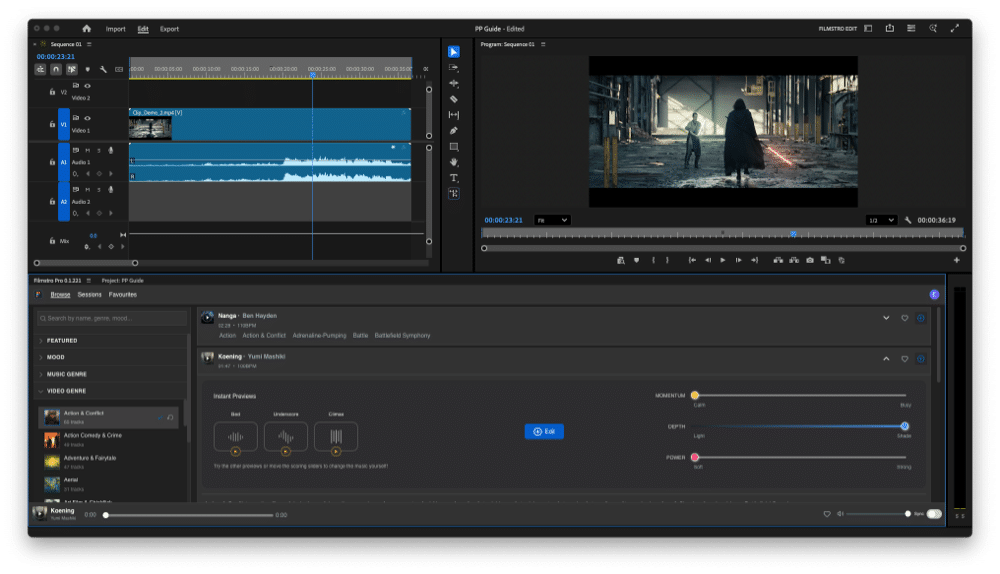
Choose from over 60 albums of high-quality, exclusive, and curated content. You can sync the music to your edit directly inside Premiere Pro and use the ‘instant Preview’ feature to quickly hear all the important sections of a track—for example, the ‘Bed’, ‘Build’, ‘Drop’, or Climax.
You can also already use the scoring sliders at the search and discoverability stage to audition a track’s emotional range to see if it will suit your edit.
2. EDIT
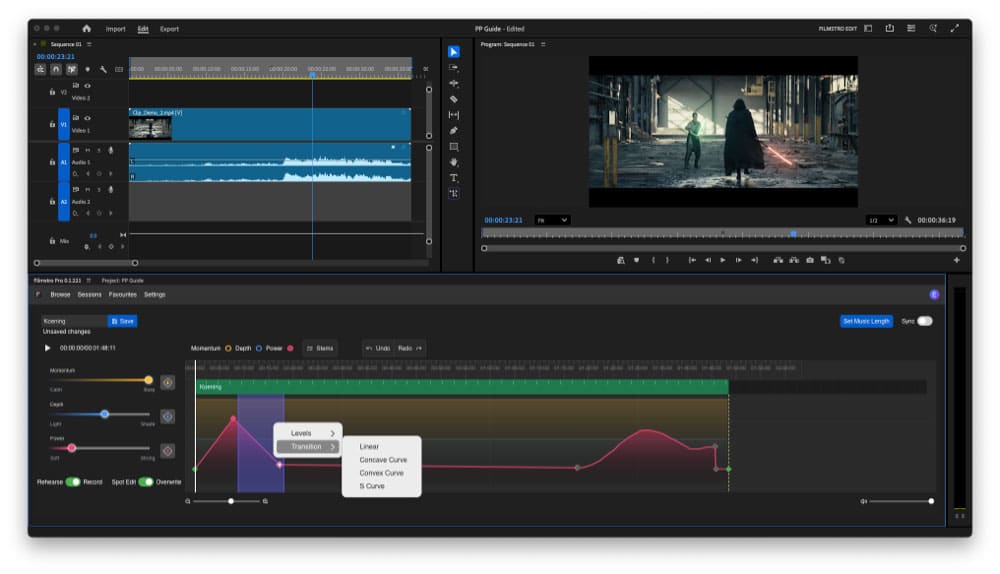
Next, edit your chosen track directly in your Premiere Pro timeline to create a custom piece of music for your project. With the ability to set frame-accurate musical key-frames and automatically get the music duration to match your Premiere timeline, you can get really close to your edit.
3. EXPORT
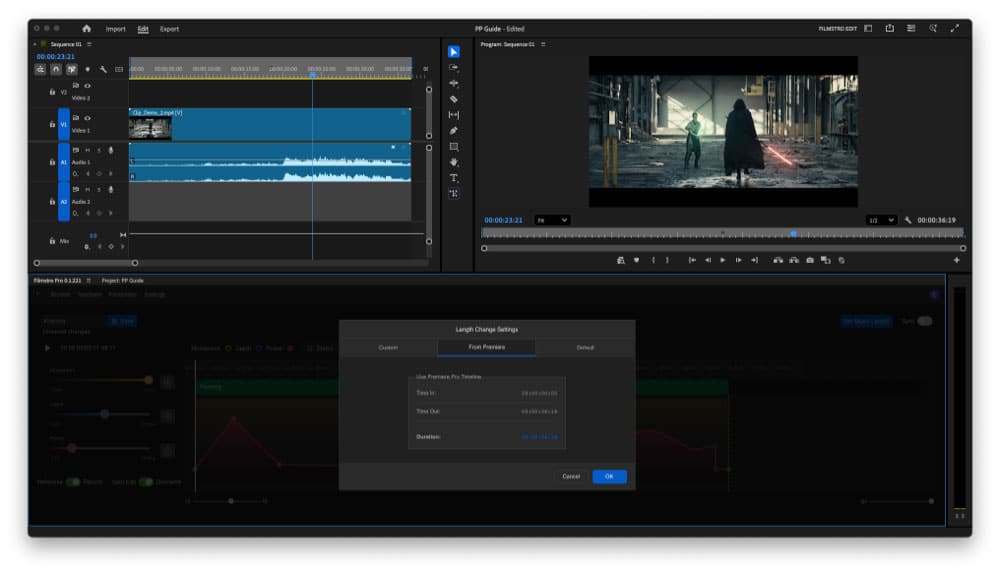
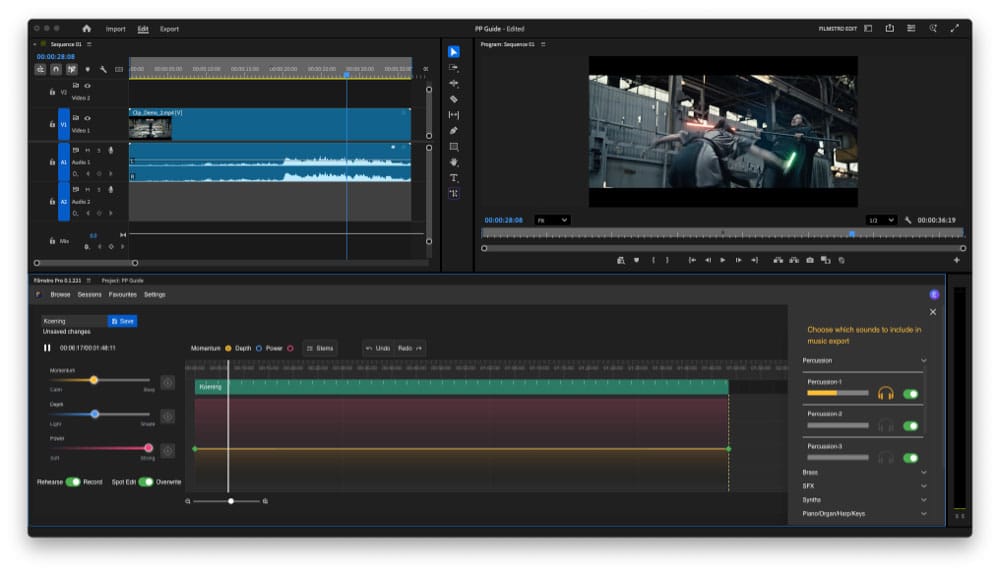
Lastly, grab a high-res WAV for your final edit and drag it into your timeline. If you need to change the length, just change your In/Out time in Premiere and set Filmstro’s time to match. You can also remove any individual instruments before export, using the ‘Stem Control’ feature.
Filmstro Features
The Filmstro Premiere Extension is very simple and easy to use. First, you can browse the music and then pick a track that you want to edit.
You can even already audition the track inside the browse page and sync the music to play back with your edit before committing to a track, using the three scoring sliders or the ‘Instant Preview’ feature to really quickly see what range the song has.
Finally, you can make lasting changes by either changing the music with the sliders or working directly on the timeline using the pen tool, keyframes, or other tools. Once you have made the adjustments you require, render and download the track. And if you want even more versions, you can access all of the stems in the ‘Stem Control’ feature, which lets you mute individual instruments to create even more bespoke solutions for your edit.
Here are a few more cool features.
| ✔ Unlimited Royalty-Free Music | ✔ No Copyright Strikes, Claims, or Muting |
| ✔ New Music Added Regularly | ✔ Keyframe Music in Premiere Pro |
| ✔ All Tracks Cleared For Use Worldwide Forever | ✔ Exclusive Music |
| ✔ Automatically adjust music duration to your Premiere timeline | ✔ Mute individual stems to switch off instruments you don’t need |
Filmstro Pro is a Premiere Pro Extension and WebApp that you can use on Mac and Windows to customize cinematic tracks in a variety of ways. Use the scoring sliders to easily change the mood by changing the momentum, depth, and power of each piece of music in their ever-growing library.
Filmstro Pricing
Filmstro offers a range of annual or monthly subscription pricing, with annual plans typically saving you around 20% compared to the monthly subscriptions. They range from discounted student plans to comprehensive Enterprise plans with multi-seat access.
Only need Filmstro for specific projects? No worries. A monthly subscription gives you access to unlimited music for your project, and you can cancel at any time.
| Creator ($14.99/month) | Creator Extension ($19.99/month) | Pro ($37.99/month) | Pro Extension ($42.99.month) | |
|---|---|---|---|---|
| Copyright-cleared music | ✔ | ✔ | ✔ | ✔ |
| Unlimited use, worldwide & in perpetuity | ✔ | ✔ | ✔ | ✔ |
| WebApp | ✔ | ✔ | ✔ | ✔ |
| Cancel any time | ✔ | ✔ | ✔ | ✔ |
| Premiere Pro Extension | ✘ | ✔ | ✘ | ✔ |
| Monetized YouTube | ✔ | ✔ | ✔ | ✔ |
| Wedding films | ✘ | ✘ | ✔ | ✔ |
| Corporate videos | ✘ | ✘ | ✔ | ✔ |
| Online ads | ✘ | ✘ | ✔ | ✔ |
| Apps & Games | ✘ | ✘ | ✔ | ✔ |
| Broadcast ads, TV & Film | ✘ | ✘ | ✘ | ✘ |
Is Filmstro Worth It or Not?
In short, yes. If you’re tired of being restricted to ordinary stock music and fancy some fun creating high-quality music for your projects, then this tool is a no-brainer. Filmstro allows you to create unique & moving soundtracks with no musical experience at all.
Their library is not the biggest when compared to other stock music sites. But if you need cinematic music, then it’s hard to find a better solution out there.
Want to find out more? Sign up and take it for a test drive! 🤓
Filmstro FAQ
Yes, the music available on Filmstro is royalty-free as long as it is used within the terms of the usage license.
When you purchase a Filmstro license, you can register your YouTube channel so that any claims are automatically released.
They remain cleared worldwide and forever. Nothing to worry about as long as you had the correct license at the time of creating the content.
No. FilmstroPro also has a web app that is developed for use with Google Chrome.
Yes, simply click the cancel button in your account Dashboard on filmstro.com or contact them via the website to ask them to cancel it for you.