

| Website | skillshare.com |
| Courses | 32K+ |
| Price | $13.99/month |
| Free Trial | Yes |
| Alternatives | Domestika |
| Pros | ✔ 32,000+ courses ✔ Easy-to-use website ✔ Variety of topics ✔ Flexible courses ✔ Affordable subscription ✔ Mobile app |
| Cons | ✘ Quality of courses can vary ✘ Certificates are not accredited |
4.5 out of 5
Summary
Skillshare suits creatives seeking flexible learning, though course quality can vary, and certificates are not accredited.
As a video editor who regularly uses online tutorials, I wanted to see how Skillshare actually performs in practice.
In this review, I’ll take an honest, hands-on look at Skillshare, covering its courses, pricing, features, and ease of use.
Get a 1-month free trial at Skillshare and explore a wide range of creative classes with unlimited access.
What Is Skillshare?
Founded in 2010 by Michael Karnjanaprakorn and Malcolm Ong, Skillshare is an online learning platform built around creative skills.
With more than 32,000 courses available, it covers everything from animation and illustration to video, photography, and music—mostly taught by industry professionals.
If you want a quick snapshot of what Skillshare looks like in action, check out this short overview:
Who Is Skillshare For?
Skillshare works best for professional freelancers and creatives who want to build on the skills they already have, especially in areas like video editing, design, photography, and illustration.
It’s also a solid option for beginners. If you’re just starting out or trying a new creative skill for the first time, there are plenty of classes designed for people who are just getting started.
How Does It Work?

Getting started with Skillshare is simple and only takes a few minutes.
- Create an account using your email address, or sign in with Facebook, Google, or Apple.
- Set up your profile and choose a few topics you’re interested in.
- Browse the platform or search for specific skills or classes.
- Pick a class and start watching straight away.
You can move through lessons at your own pace, pause whenever you like, and come back to classes later.
Features
Skillshare has a few features that stood out for me while using the platform. Here are the main ones.
Simple Categories

One thing I like is how Skillshare organizes its courses into clear, easy-to-browse categories. It makes it much easier to explore different topics without feeling overwhelmed.
| AI & Innovation | Design | Music & Audio |
| Animation & 3D | Development | Personal Development |
| Art & Illustration | Film & Video | Photography |
| Crafts & DIY | Home & Lifestyle | Productivity |
| Creative Career | Marketing & Business | Writing & Publishing |
| Creativity & Inspiration |
These categories cover a wide mix of creative, professional, and personal development skills, with plenty of overlap depending on what you’re learning.
If you already know what you’re looking for, you can also skip browsing and use the search bar to find specific courses directly.
The platform suggests classes based on what you’ve watched and searched for. While these recommendations aren’t always perfect, they can help surface courses you might not have found on your own.
Flexible Courses
One thing I noticed while using Skillshare is how flexible the courses are. There’s no single format you’re locked into, which keeps things from feeling repetitive.
Some classes are short and focused, often around 10 minutes, while others are more in-depth and made up of dozens of shorter lessons that can run for a few hours in total.
Many classes include simple assignments, which encourage students to share their work and learn from each other. It’s an optional part of the experience, but a nice extra if you like a bit of structure or community feedback.
Class Quality & Instructors
Since Skillshare courses are created by individual instructors, the quality can vary. Some classes are well-structured and professionally produced, while others feel more casual. That said, many instructors are working creatives who share practical, real-world insights rather than overly polished theory.
Easy-to-Use App
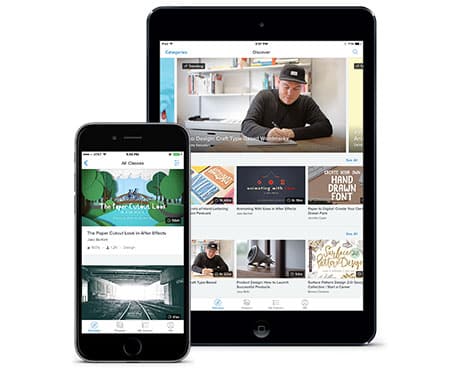
If you like learning on the go, Skillshare’s mobile app makes that easy. It’s available on both iOS and Android and gives you access to your account and courses from your phone or tablet.
The app lets you watch lessons wherever you are, pick up where you left off, and download classes for offline viewing. It’s straightforward to use and does what you’d expect without being too complicated.
Learning at Your Own Pace
Skillshare is designed for self-paced learning. You can pause lessons, revisit specific sections, and move through courses as quickly or slowly as you like, which works well if you’re fitting learning around client work or other commitments.
Community & Project Sharing
Many classes encourage students to share projects or works in progress. This isn’t mandatory, but it’s a nice option if you want feedback or enjoy learning alongside others.
You can browse other students’ projects and comments without actively posting yourself.
Helpful Blog
Skillshare also runs a blog that supports both students and teachers. It includes practical guides and tutorials, resources for instructors, community stories, and general updates from the Skillshare team.
It’s not essential to using the platform, but it can be a useful extra if you like learning through articles as well as video.
Pricing
Skillshare uses a subscription model. A Premium membership costs about $13.99/month when billed annually (around $167.88/year), or roughly $32/month if you prefer to pay monthly.
The subscription gives you unlimited access to the full course library, so you’re not paying per class. This works well if you plan to take multiple courses over time rather than just one or two.
Skillshare also offers a 30-day free trial, which gives you full access to the platform for a limited time. It’s a good way to explore the courses and see if the learning style suits you before committing to a subscription.
Is Skillshare Worth It or Not?
In short, yes. I think Skillshare is a solid option if you’re looking to build creative skills or explore something new at your own pace. The platform is easy to use, the course library is broad, pricing is reasonable, and the flexible format makes it easy to fit learning around work or other commitments.
That said, it’s not without its limitations. Course quality can vary depending on the instructor, and certificates are not formally accredited. If your main goal is adding credentials to your resume, another platform may be a better fit.
But if you’re the type of learner who prefers short, flexible lessons over structured academic courses, Skillshare is worth checking out.


