

| Website | istock.com |
| Photos | 173 million |
| Videos | 17.5 million |
| Music | 35,000 |
| Sound Effects | 90,000 |
| Price | $29.99/month |
| Licensing | Royalty-free |
| Free Trial | Yes (10 images) |
| Alternatives | Artgrid & Shutterstock |
| Pros | ✔ Huge library of stock assets ✔ Flexible pricing options ✔ Simple licensing ✔ Downloads roll over into next month ✔ Integrations with Adobe CC and Dropbox |
| Cons | ✘ Expensive ✘ No unlimited downloads |

4 out of 5
Summary
iStock delivers high-quality, exclusive visuals, but higher pricing and a lack of unlimited downloads may limit budget-conscious content creators.
As a video editor who works across commercials and branded content, I’ve used a lot of different stock media platforms over the years. In this review, I’ll test out iStock by looking at stock media quality, pricing, and website features.
What Is iStock?
iStock (previously known as iStockphoto) is a stock media platform owned and operated by Getty Images. It’s a major player in the business with big companies like Walt Disney, Warner Bros, and Apple using it.
Who Is iStock For?
The iStock website is designed with both companies and freelancers in mind, whether you’re a video editor, graphic designer, photographer, animator, or content creator.
It’s a great resource for anyone who needs stunning visuals to help their project. So if you’re trying to connect with your audience, then iStock has got you covered.
How Does It Work?

How Does iStock Work?
iStock is easy to use, and getting started takes only a few simple steps.
- Create a free account and confirm your email.
- Choose a plan—a subscription or one-time credits.
- Search the library and use filters to find what you need.
- Preview the asset to check if it fits your project.
- Select the license type (Essentials or Signature).
- Pick your resolution and download the file.
- Organize your assets in your account or via Dropbox.
iStock’s Standout Features
iStock hits that sweet spot between quality and ease of use, offering tools and options that genuinely make your creative workflow smoother. Here are some of the features that really set it apart:
Massive Asset Library
iStock’s library is seriously big. With millions of photos, videos, vectors, and illustrations, you’re almost guaranteed to find something that fits your project.
Exclusive High-Quality Content
The Signature collection is where iStock really stands out. These are premium, curated visuals you won’t see on other stock sites, and the quality really shows.
Images come in full-resolution 300 DPI and high-megapixel files that hold up in print. Video quality is equally strong, with UHD 4K footage available in common frame rates like 24fps, 30fps, and 60fps, giving you clean, sharp results that grade well in post.
Advanced Search and Filtering

iStock’s search tools make finding the right clip or image a lot easier. You can filter by orientation, color, size, resolution, number of people, and more—so you’re not wasting time scrolling endlessly.
Flexible, Royalty-Free Licensing
Everything comes with simple, royalty-free licensing. Once you download a file, you can use it without worrying about extra fees or complicated restrictions.
Seamless Software Integrations
iStock plugs right into Adobe Creative Cloud and Dropbox, so you can browse and download assets without jumping between apps. It’s a real workflow booster.
Multiple Purchase Options
Whether you need just a couple of assets or you download a lot every month, iStock gives you options. Subscriptions are great for regular use, and credit packs are perfect for one-off projects.
Licensing Peace of Mind
iStock includes legal protection with its assets, so you can use them confidently in your projects without stressing about licensing issues.
Pricing
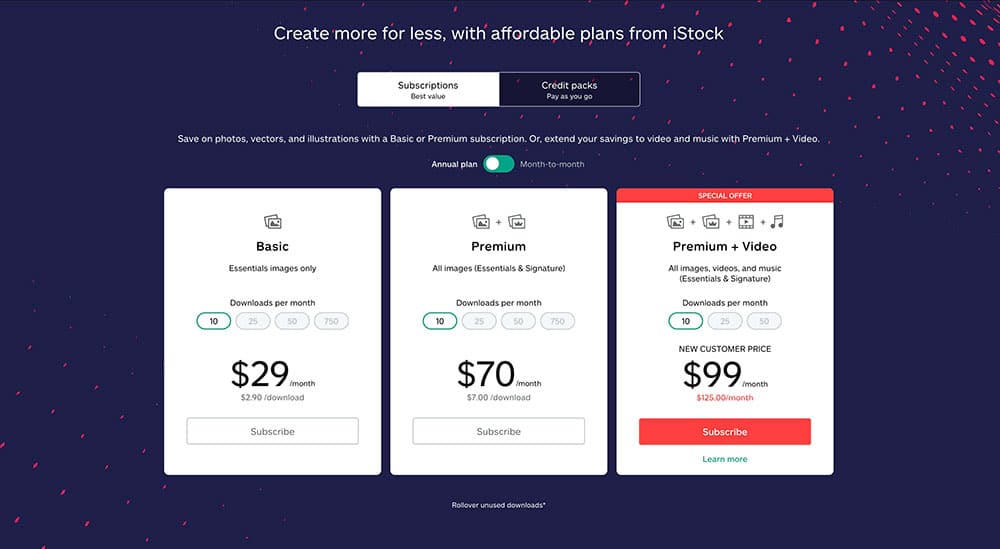
As mentioned, iStock isn’t cheap; in fact, it’s the most expensive stock photo platform in the world, with Shutterstock being a close second.
However, they offer two main ways to pay: subscriptions and one-time credits. Let’s quickly go over them here so you can get an idea of what you’ll be paying.
Subscriptions
Subscriptions are the best value option. They provide a set number of downloads each month under a flat fee.
Basic (Essentials only)
| Downloads/month | Annual plan (billed monthly) | Month-to-month plan |
|---|---|---|
| 10 | $29 | $40 |
| 25 | $49 | $65 |
| 50 | $90 | $99 |
| 750 | $167 | $199 |
Premium (Essentials + Signature photos)
| Downloads/month | Annual plan (billed monthly) | Month-to-month plan |
|---|---|---|
| 10 | $70 | $99 |
| 25 | $120 | $149 |
| 50 | $199 | $229 |
| 750 | $334 | $399 |
Premium + Video (Any asset type: photos, videos, vectors, icons)
| Downloads/month | Annual plan (billed monthly) | Month-to-month plan |
|---|---|---|
| 10 | $99 | $149 |
| 25 | $165 | $229 |
| 50 | $265 | $349 |
One-Time Credits
For more flexibility (or if you download only occasionally), iStock lets you buy credits and use them as needed.
| Credits | Price |
|---|---|
| 1 | $15 |
| 3 | $33 |
| 6 | $60 |
| 12 | $115 |
| 18 | $170 |
| 24 | $220 |
| 36 | $325 |
| 60 | $520 |
| 150 | $1,250 |
| 300 | $2,400 |
One credit downloads an Essentials image; three credits download a Signature image; six credits download vectors or video files. Credits don’t expire as long as you log in at least once a year.
Is iStock Worth It or Not?
In short, yes. iStock costs more than some competitors, but the quality, reliability, and ease of use make it a strong choice. If you need polished visuals and a smooth, dependable workflow, it’s definitely worth a look.
Just keep in mind that there’s no unlimited download option, so it may not be the best fit if you need high volume every month.
FAQ
Yes. iStock’s license agreements are all royalty-free. Both the standard and the extended licenses are available. Once you pay and download an image or video from iStock, you won’t have to pay any extra royalties.
If you have a one-off project, then credits are a good option. If you download more than four images (photos, illustrations, and vectors) or two videos in a month, then you’ll get the best value with a subscription.
Credits never expire as long as you sign into your account at least once a year.
Yes. The iStock free trial gives you a month of the Basic plan, which includes 10 free stock image downloads from the Essentials collection.
Yes, it’s completely safe. All communication, data, and payments are encrypted.


