

| Website | motionarray.com |
| Music | 100,000 |
| Sound Effects | 11,000 |
| Videos | 100,000 |
| Photos | 100,000 |
| Licensing | Royalty-free |
| Price | $16.67/month |
| Free Trial | Yes |
| Alternatives | Envato Elements & Artgrid |
| Pros | ✔ Variety of digital assets ✔ Unlimited downloads ✔ Affordable pricing ✔ Simple full-usage license |
| Cons | ✘ The library isn’t as big as some other platforms ✘ Can’t purchase assets separately ✘ Can’t use downloaded assets in new projects if you cancel your subscription |

4.5 out of 5
Summary
Motion Array offers excellent value for money with unlimited downloads and affordable pricing—although its library is smaller than some competitors.
In this review, I’ll test out Motion Array by looking at stock media quality, pricing, and key website features.
As a video editor, I’m always on the lookout for new tools or resources to save time. Motion Array is an all-in-one video asset platform for content creators with unlimited downloads. You can find anything from stock footage to templates, presets, and music.
Get 2 months free and enjoy unlimited downloads, exclusive plugins, video collaboration, and more. 🙌
What Is Motion Array?
Motion Array is a stock footage platform originally founded in 2013 by Tyler Williams and Eri Levin.
At the end of 2020, it was bought by the stock media company Artlist. This was big news in the industry as the merger has turned both platforms into a hub for video creators.
Motion Array offers a membership-based subscription where you can choose from an unlimited library of music, videos, images, and templates.
Who Can Use Motion Array?
Pretty much anyone looking to create high-quality videos in an easy, fast, and affordable way. For example:
- YouTubers
- Animators
- Video Editors
- Filmmakers
- Photographers
So, whatever type of creator you are, whether for work, learning, or fun, Motion Array might be the perfect solution for you.
How Does It Work?

Working with Motion Array is so easy that you can take a project from concept to completion incredibly fast.
First, you’ll need to sign up for a subscription. Then, log in to your account and start browsing. Then, on the Motion Array homepage, at the top, the content is divided into.
- Templates – Adobe After Effects, Adobe Premiere Pro, Motion Graphics, Adobe Premiere Rush, Davinci Resolve, and Final Cut Pro.
- Presets – Adobe After Effects, Adobe Premiere Pro, and DaVinci Resolve Macros.
- Audio – Royalty-Free Music and Sound Effects.
- Videos – Footage and Motion Graphics.
- Images – Illustrations, icons, photos, and graphics templates.
Once you have found something you like, download it, and you can use it right away.
Motion Array Features Overview

There are lots of reasons I think Motion Array provides value for money. The platform features over 800K assets and is constantly expanding. Here are our top highlights.
Ease of Use
Motion Array is very easy to use. You can search, preview, and download any asset you like at the touch of a button and use it wherever you want.
Unlimited Downloads
Download every asset you need, when you need it, from video templates and stock footage to photos, royalty-free music, and sound effects.
High-Quality Content
All assets are high-quality, meaning you can use them for anything from broadcast to online-based projects.
Simple License
Everything is covered by their simple, full-usage license forever. No matter the type, size, or distribution of your projects, they have you covered.
Tools
Motion Array also includes a handy collaboration tool. It’s called Review, which helps freelancers work together more easily.
40+ Free Plugins
Get access to over 40 professional plugins. Add effects ranging from color grading and keying to particles and film grain.
Adobe Compatible
If you’re like me and edit only in Premiere Pro, then this is a nice feature. It allows you to search and browse the entire Motion Array library inside your Adobe applications. Download and import them right into your timeline.
Motion Array Pricing (Monthly, Annual, Team)
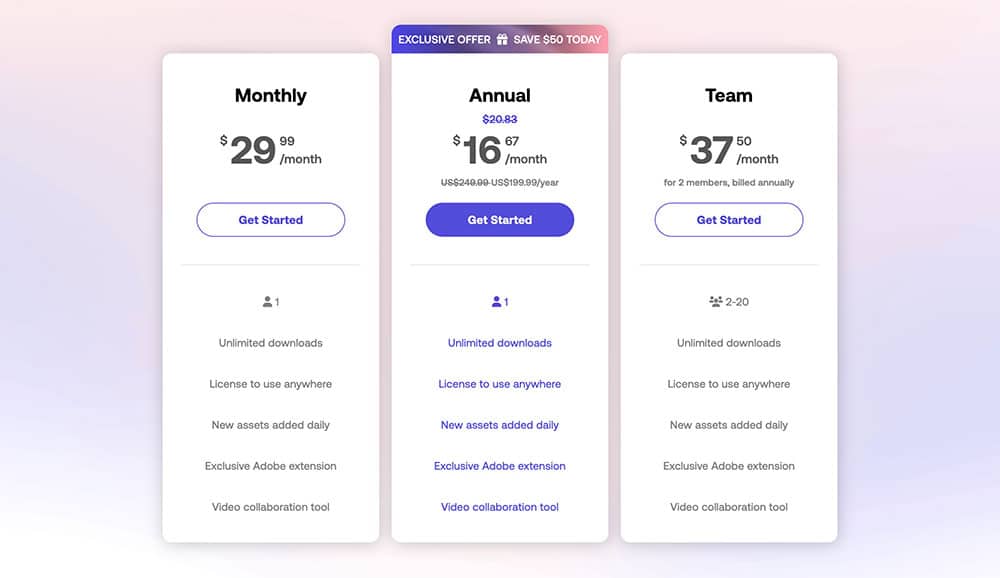
Now, let’s talk price. How much does it cost?
New users can get familiar with Motion Array by trying it for free. For one month, you can access hundreds of free assets available on the platform.
But, if you want to make the most of Motion Array, you’ll need to sign up for a Monthly, Annual, or Team subscription. Here is a quick breakdown of what’s included:
| Monthly | Annual | Team | |
|---|---|---|---|
| Price | $29.99/month | $16.67/month ($199/year) | $37.50/month (billed annually) |
| Users | 1 | 1 | 2-20 |
| Unlimited downloads | ✔ | ✔ | ✔ |
| License to use anywhere | ✔ | ✔ | ✔ |
| New assets added daily | ✔ | ✔ | ✔ |
| Exclusive Adobe extension | ✔ | ✔ | ✔ |
| Video collaboration tool | ✔ | ✔ | ✔ |
So, what happens once you have completed a project? You keep ownership of all your downloaded assets. I think this is a nice feature as it means you’re not tied into a subscription.
Is Motion Array Worth It? (Our Honest Verdict)
I think Motion Array is a pretty affordable way for creators to access unlimited video assets for editing. The only downside is that you can’t use downloaded assets in new projects after canceling your subscription.
Also, it’s not as big as other libraries. However, at less than $20 a month and with a constantly growing catalog, it’s hard to complain.


